Click here if you are not automically redirected.
Jumping from Ender3 and Ender6 to K2pro. K2pro is fast, so far the quality is also good.
That's the kind of service that make you sleep better while waiting for something that is not a cheap investment.
Having already owned two Creality printers (K1max and Hi), I bought the K2combo to test its multi-color printing capabilities.
I took advantage of the Black Friday deals to get it at a very good price (€497 - discount and gift card deducted).
The delivery went very smoothly: about a week between ordering and receiving it.
Setting it up is surprisingly easy.
You take the components out of the box, follow the instructions in the manual (or the Creality videos), and in less than 30 minutes (being very careful and therefore quite slow), the machine is plugged in and running its first tests.
As is often the case with a new machine, I performed the first test with a file saved on the printer: a Benchy.
The print went well, and the result was very satisfactory.
However, on this test file, the color change occurred at different heights. This type of result is possible with a single-color printer by taking breaks and manually changing filament.
This test therefore confirmed that filament changes and CFS (Color File System) work, but doesn't really justify owning a multi-color printer.
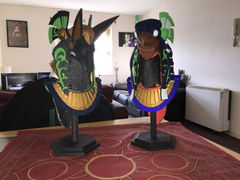
The second test was performed on a file I created with multiple colors on the same layer.
The result is satisfactory but not perfect. The print quality is lower compared to a single-color print.
And naturally, the print time is increased due to the multiple purges.
These print defects are not due to the machine itself, but to the settings I used and the way I modeled the print.
In the end, this machine shows promise, but unsurprisingly, it will require a learning curve, both in terms of the slicer settings and the modeling techniques.
At the price I paid, it's an excellent purchase that I don't regret and that will help me grow my business.
The pros:
- Quick and easy installation
- 4-color printing possible right out of the box
- Up to 16-color printing possible (by purchasing additional color cards)
- Very reasonable noise level
The cons:
- Long printing times (this isn't specific to the K2combo but is common to all multi-color printers)
Good quality machine that is perfect for small medium projects or beginners. Prints very well out of the box and quality is excellent with minor tweaks
Produit très sympa